
Free
€0.00
Any number of sites
- All Free features
- Updates from WordPress.org
- WordPress.org support forum
GioContextAi
GioContextAi publishes llms.txt, llms-full.txt and ai.txt from your WordPress content, lets you choose what they include and shows which AI crawlers request your site and which files. The Pro add-on adds brand voice, AI instructions, taxonomy context, a detailed readiness audit and crawler statistics for every post, page and product.
The problem
Pages, posts and products are wrapped in theme markup. To offer a plain-text overview of your site, such as an llms.txt file, you would have to write it by hand.
Then you would have to update it every time you publish, edit or unpublish something.
And you would still not know which AI crawlers ask for your pages, or whether they open the files at all.
llms.txt is a proposed convention, not an official standard. Each AI system decides whether to read it.
Each feature shows where you find it in GioContextAi and whether it is part of the Free version or the Pro add-on.
Serves /llms.txt, a list of your content with links, /llms-full.txt, the same list with the full text, and /ai.txt. The files are generated through WordPress rewrite rules, so nothing is written to disk, and they refresh when you save content.
Your site’s root URL
Select which public post types are included, custom post types such as WooCommerce products among them.
GioContextAi → Settings → General
Password-protected content, content set to noindex in Yoast SEO, Rank Math or SEOPress, and pages such as cart, checkout, account and privacy policy are left out.
Applied automatically
Remove a post or page from the context files with a checkbox in the editor.
Editor sidebar → GioContextAi Settings
Publishes /products.json with WooCommerce product data: title, description, price, availability, image and link. Free includes up to 100 products; Pro lets you pick the post type, map fields and paginate the feed.
GioContextAi → Settings → AI Product Feed
Counts the requests that known AI crawlers, such as GPTBot, ClaudeBot, PerplexityBot and Meta-ExternalAgent, make to your site when WordPress handles them: requests per day by type of crawler, what they request, how the site responded and which AI context files they opened. Last 7 or 30 days, no IP address or personal data stored.
Crawlers are identified by the user-agent they declare, which can be imitated. Requests answered by a page cache or a CDN are not counted.
GioContextAi → AI Crawlers
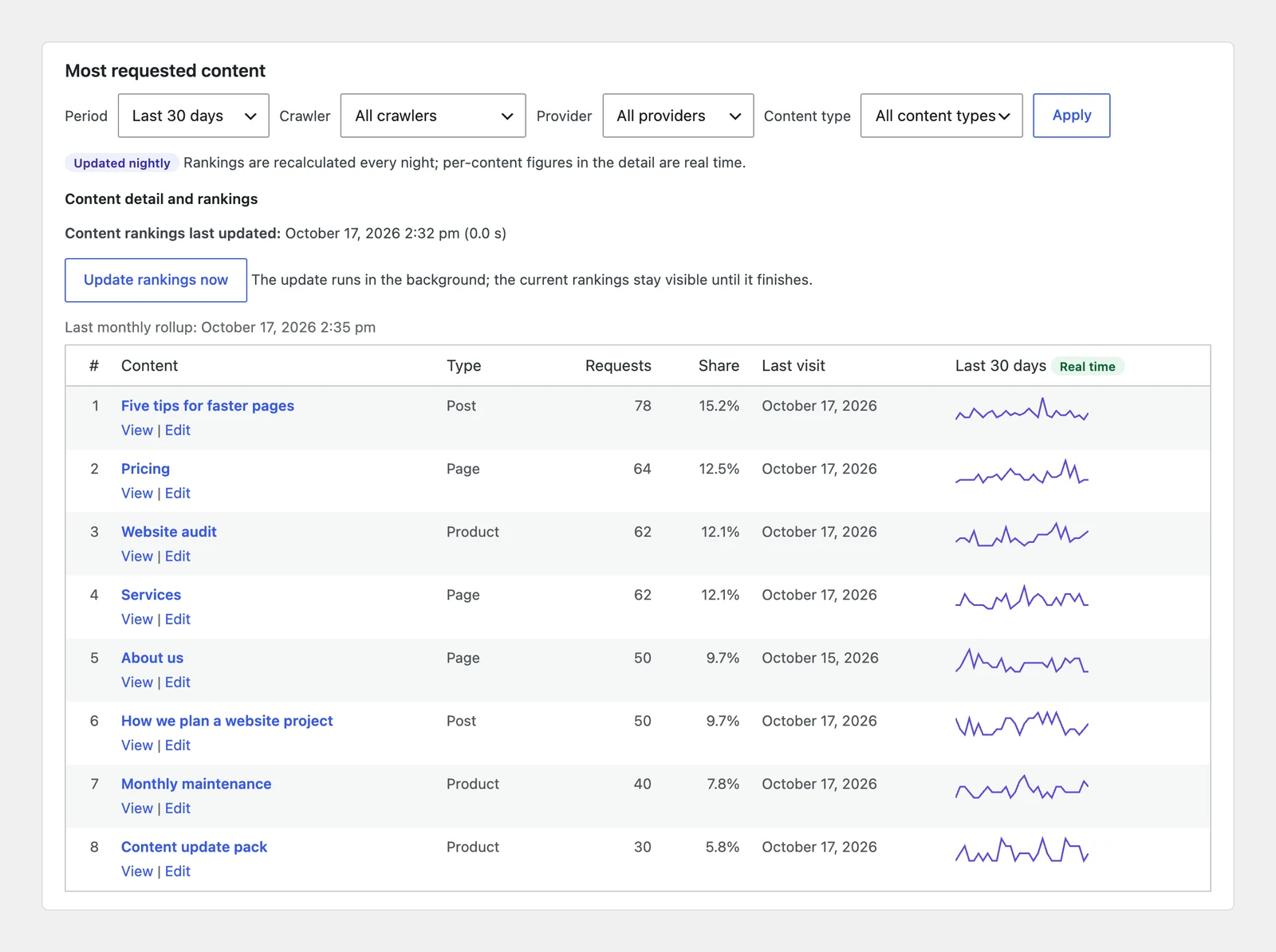
Rankings of the most requested posts, pages, WooCommerce products and terms, filters by crawler and by provider, up to 12 months of history and the request history of each content.
GioContextAi → AI Crawlers → Content, WooCommerce, Taxonomies
A box in the block and classic editors shows the crawler requests of the last 30 days for the post you are editing.
Editor sidebar → AI crawlers
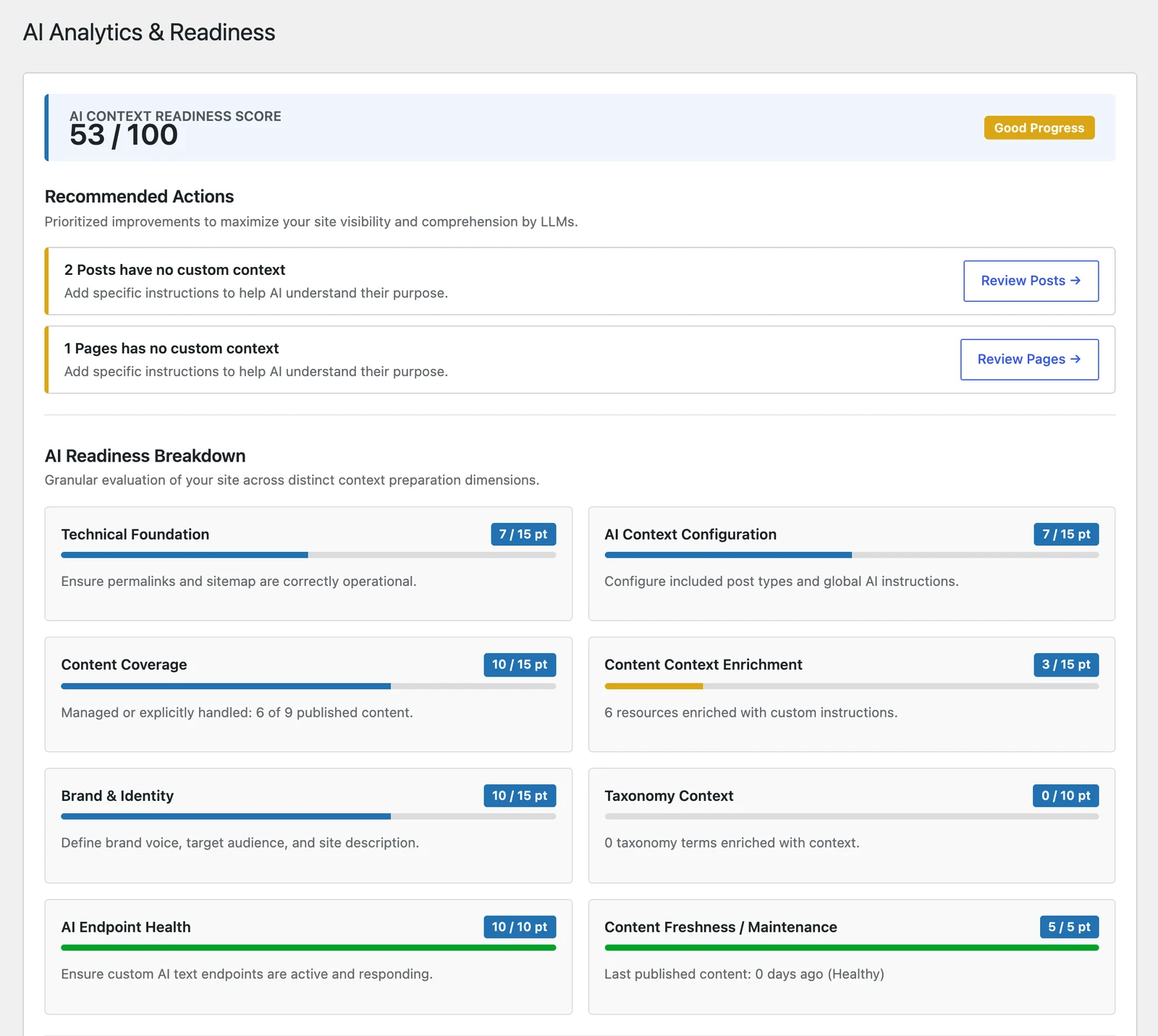
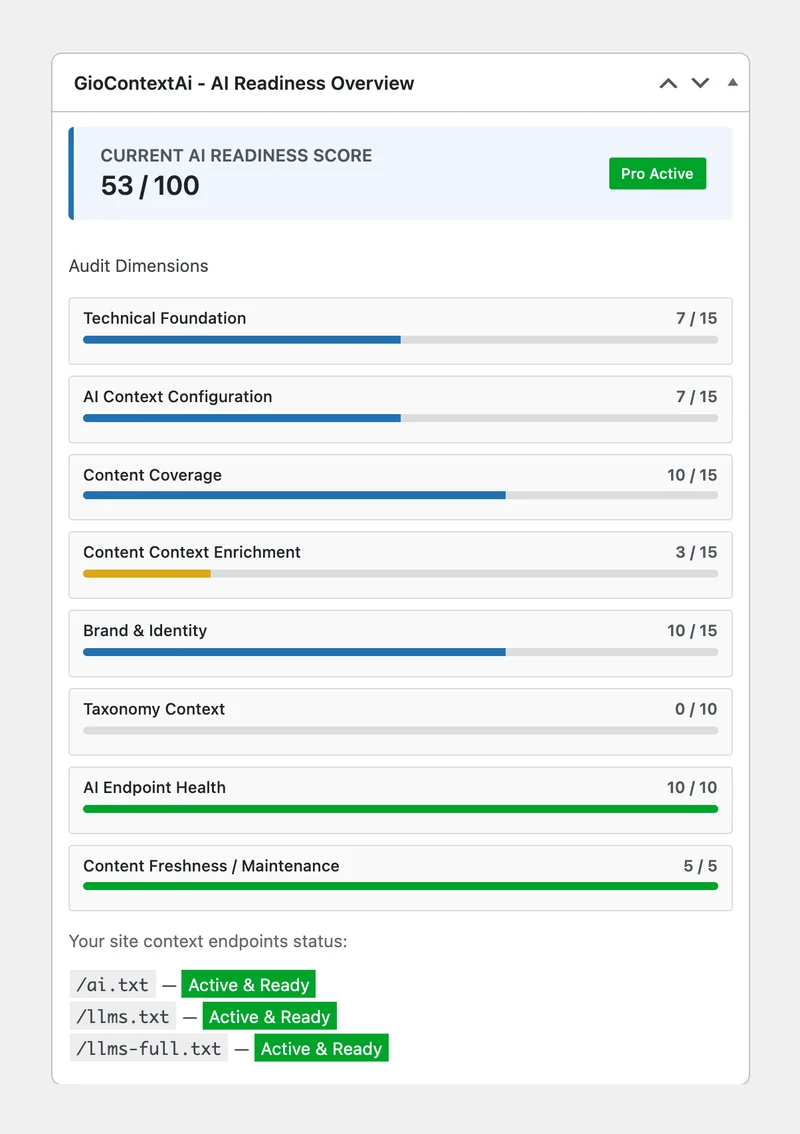
A score out of 100 based on permalinks, sitemap, published content, freshness and site identity. Pro expands it into an eight-part audit with recommended actions and a dashboard widget that also shows the crawler requests of the last 7 days.
GioContextAi → AI Analytics
Describe your brand’s tone and add instructions. Both appear in the context files under their own headings.
GioContextAi → Settings → Brand Voice & AI
Include categories and other taxonomies, with their term descriptions, in the context files.
GioContextAi → Settings → Brand Voice & AI
Add a note to a single page or term, or exclude a term from the context files.
Editor sidebar and term edit screen
GioContextAi
GioContextAi → Settings → General: include Posts as well as Pages, save, then open /llms.txt. Demo site with sample content, recorded in real time.
GioContextAi → AI Crawlers: requests per day, what crawlers request and the AI context files they open, then the most requested content (Pro). Demo site with simulated crawler requests, recorded in real time.
AI Crawlers → Content (Pro): ranking of posts, pages and products by crawler requests, with filters by crawler and provider. Figures from a demo site.
AI Analytics (Pro): readiness score, recommended actions and the eight audit areas. Figures from a demo site.
Dashboard widget (Pro): readiness score, the eight audit areas and the crawler requests of the last 7 days.
GioContextAi is free on WordPress.org. The Pro add-on unlocks the features marked Pro and is licensed per site, billed yearly.
| Feature | Free | Pro |
|---|---|---|
| llms.txt, llms-full.txt and ai.txt | Included | Included |
| Public and custom post types | Included | Included |
| Automatic exclusions (noindex, password, system pages) | Included | Included |
| Exclude a single page | Included | Included |
| Product feed | Up to 100 products | Configurable |
| AI crawler monitor | Whole site, 7 or 30 days | Plus every post, page, product and term, 12 months |
| AI crawlers in the editor | Not included | Included |
| Readiness score | Basic score | Eight-part audit and dashboard widget |
| Brand voice and AI instructions | Not included | Included |
| Taxonomy context | Not included | Included |
| Page and term instructions | Not included | Included |
| Plugin updates | From WordPress.org | From giosuite.com while the license is active |
€0.00
Any number of sites
€19.00/year
Billed yearly
€39.00/year
Billed yearly
€129.00/year
Billed yearly
Buying a license requires a GioSuite account, where you manage your sites, API keys and downloads.
A proposed convention for offering language models a plain-text overview of a website. It is not an official standard, and each AI system decides whether to read it.
GioContextAi cannot guarantee that. It publishes and maintains the context files; whether an AI system uses them is up to that system.
No. It shows that a crawler asked for a page or a file. It does not show whether the page was indexed, cited or used in an AI answer.
Only requests handled by WordPress are counted. Requests answered by a page cache, a server cache or a CDN never reach WordPress, so the figures are a lower bound; the AI Crawlers page warns when it detects a page cache.
Yes. Content set to noindex in Yoast SEO, Rank Math or SEOPress is left out of the context files.
No. The files are generated on your server. The Pro add-on contacts giosuite.com only to check your license and updates, and sends a daily status check with your site’s domain and an installation ID.
1, 3 or 30 sites, depending on the plan. Add each site’s domain in the Licenses section of your account.
Brand voice, AI instructions, taxonomy context, page and term instructions, the full audit, the configurable feed and the per-content crawler statistics switch off; collected data is kept. The context files and the site-wide crawler monitor keep working with the Free features. Pro updates stop until you renew.
There are no reviews for this plugin yet.
Please log in to leave a review.
Start with the Free version and add Pro when you need the extra features.